12/27/10

Update Avira-Antivirus in Off-Line

Hi, readers! Do you want to update your Avira-Antivirus? But no internet connection..?? Take it easy, you still can do it!
Here are the steps:


First, open Avira-Antivirus. Right-click on hidden Avira Icon on Tray System.
Choose Start Avira--> click menu Update--> Manual Update

Update Avira-Antivirus in Off-Line


Find your Update File of your Avira (VDF File), and the format is .zip. (You dont need to extract it, because it will automatically be extracted). Click Open.
If you are not download yet, click here

Wait until the process is finished...

DONE! Your Avira has been updated.
It's easy and simple, right..?? ^^

And... "NOW I KNOW...!!!"


(c) Written by: Nanda Firsta
Source: Own Experience

READ MORE - Update Avira-Antivirus in Off-Line

Accelerate your Mozilla Firefox

Hey, wanna your internet connection become faster...?? Don't worry...!!! By using Mozilla Firefox, your internet access can run fastly and faster... Here are the steps:

Accelerate Mozilla Firefox


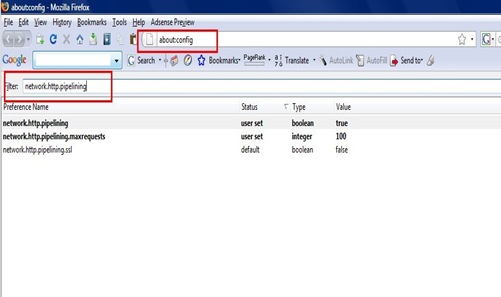
1.Type “about:config” into the address bar and hit return.
Scroll down and look for the following entries:
network.http.pipelining
network.http.proxy.pipelining
network.http.pipelining.maxrequests
Normally the browser will make one request to a web page at a time. When you enable pipelining it will make several at once, which really speeds up page loading.

2. Alter the entries as follows:
Set “network.http.pipelining” to “true”
Set “network.http.proxy.pipelining” to “true”
Set “network.http.pipelining.maxrequests” to some bigger number like 30. This means it will make 30 requests at once.
Accelerate Mozilla Firefox

3. Lastly right-click anywhere and select New-> Integer. Name it “nglayout.initialpaint.delay” and set its value to “0″. This value is the amount of time the browser waits before it acts on information it receives.
Accelerate Mozilla Firefox

Now, restart your Mozilla...!!! Tadaaa....!!!!!

PS: If you’re using a broadband connection you’ll load pages MUCH faster now!

And... "NOW I KNOW...!!!"

(c) Written by:
Nanda Firsta
Source: Own Experience
READ MORE - Accelerate your Mozilla Firefox

Upgrade your Flashdisk from 1GB to 2GB

Hello all, now I wanna share a good tricks, "Upgrade Your Flashdisk from 1GB to 2GB". It's amazing, isn't it? Maybe, it sounds impossible, but here, I wanna share to you all how is the way. Check this out! ^^
Upgrade Flashdisk from 1GB to 2GB


First, download the "1GB to 2GB" Software. Click this link:

And, here are the steps:
  1. Make sure your flashdisk's operation system is FAT. If no, format your flashdisk into FAT.
  2. Install and start your downloaded software.
  3. Choose the location of your flashdisk (ex: H:, F:, etc...)
  4. click Fix – OK – OK – OK...
    Upgrade Flashdisk from 1GB to 2GB
  5. Unplug your flashdisk and then plugs it again.
  6. Tadaaaa.....!!!
Your flashdisk has become 2GB...!!! Try it.. :)

_______________________________________________________________________________
WARNING!
All damage that happens to your flashdisk is your own risk. And I dont responsible for any harm, I just share the steps based on my experience. ^^
____________________________________________


And... "NOW I KNOW...!!!"


(c) Written by: Nanda Firsta
Source: Own Experience
READ MORE - Upgrade your Flashdisk from 1GB to 2GB

How to Make your Computer can Speak

Hello, guys. Here, I'll give you all nice trick, "How to Make Your Computer can Talk...!!!" Hmm... Awesome Info, wanna know more..?? Ok, here it is:

Make Computer can Speak
Here’s a cool little feature of Windows that can be abused so that you can make your computer talk or speak whatever you tell it! This method takes advantage of a built-in API installed on most Windows XP machines called SAPI (Speech Application Programming Interface).

The Microsoft Speech API is what is used for the Narrative accessibility feature built into Windows. You can also write programs that call the API, which would allow you to let your applications speak.
But making your computer say what you want is pretty easy actually!
Here’s how you do it:


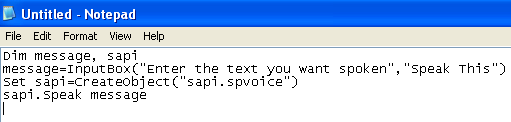
Step 1: Open Notepad and paste the following text into a new document:
______________________________________________________________________
Dim message, sapi
message=InputBox(“Enter the text you want spoken”,”Speak This”)
Set sapi=CreateObject(“sapi.spvoice”)
sapi.Speak message
______________________________________________________________________

It should basically look something like this:

Make Computer can Speak


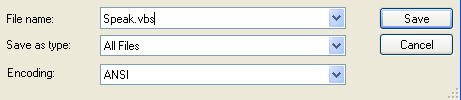
Step 2: Now save the file, give it any name, but make sure you also type .VBS after the name. Also, for the Save as type box, choose All files instead of the default Text Documents. For example: "speak.vbs", look at this example below:
Make Computer can Speak


Step 3: Now double-click on the VBS file and you should see a input box where you can type in the text you want spoken! Go ahead and type something and click OK.
Make Computer can Speak

That’s it! Your computer will speak to you in the default voice, which for me was some scary seductive male type of voice! What about yours? Enjoy this nice trick!
(This would be fun to do on someone else’s computer as a joke.)


And... "NOW I KNOW...!!!"


(c) Written by: Nanda Firsta
Source: Own Experience

READ MORE - How to Make your Computer can Speak

12/25/10

8 Important Things in Designing Your Blog/ Website

Hey all… Today, I would like to show you about “8 Important Things in Designing Your Blog/ Website”. Maybe, some of us like to design our blog to make it become more interesting. We like to add something such as gadget/widget, appearance, background, templates, etc. to make our blog preview is good. But, there are several things that oppositely make your blog looks bad by the visitors. So, remember 8 things below. Here they are:

Important Thing in Designing Blog/ Website

1. Don’t Use Splash Page/ Welcome Page
Maybe you’ve ever opened a blog/website, but in a first page there is a welcome page which is usually ask you to “CLICK HERE TO ENTER”, etc. In fact, this page just be viewed without any usefull function. Don’t let your visitors have a reason to click “Back” button and leave your blog before know what is your blog’s content. Let them know directly and easily what you will share in your blog WITHOUT annoying welcome page.

2. Don’t Show too Many Advertisement Banner
What do you feel if you visit a blog/website which has a lot of advertisment there? Moving picture, moving text, full-colour…??? Of course, you will feel disturbed, right? Actually, an advertisement banner which is placed in a right place and right number will make the visitors are excited to click them. But, oppositely, too many banners will cause them ignore ALL of your advertisements. Its better if you show an advertisement which is RELEVANT with your blog/website.

3. Use a Clear and Simple Navigation Menu
You need to provide navigation menu to direct the visitors to everywhere in your blog you want. But, use the simple design. By this way, your blog visitors will stay longer in your blog to read your articles continuously. Don’t use a navigaton menu which use difficult Flash or multi drop-down menu, because if the visitors confuse with it, quickly they will leave your blog/website.

4. Have a Clear Indication about Where the User is.
When the visitors is walking on your blog, of course you want to make them know truly about the part of website/blog where they are. By this way, they will easy to access relevant informations/articles. Don’t make the visitors confuse when they are in your blog.

5. Don’t Use any Voice/Backsound in your Blog/Website
If the visitors want to stay longer in your blog to read more of your contents, make sure they wont be disturbed by replaying music/backsound in their headphone or speaker. Beside that, backsound will make your blog/website loading become slower. If you still want to add backsound, give the volume control so that the visitors can adjust it when they start to feel disturbed.

6. Don’t Use too Many Widget/ Gadget and Flash Content
If you are included in a blogger who like to decorate your blog appearance, just use the usefull widget that is really needed by the visitors. (Like this blog, there is a Google Translator Widget to translate all of this blog content by the visitors). Caution, each widget or gadget you have added into your blog, will increase the time to load your page. It means, too many widget/gadget will spend more time for the visitors to open your blog/website page. So, just use a simple and usefull widget.

7. Don’t Use Widget to Detect Users IP
Adding IP Detector in your Blog/Website will make the visitors feel not safe and disturb their privacy. It wont make your blog/website become more cool and trendy, but it will make your visitors leave your page fastly and increase the time to page loading. Its better for you to apply this kind of wifget if your blog/website handles a lot of client.

8. Use Good and Simple Colour
Wanna make your visitors enjoy reading your articles…??? And wanna make them back again to visit your blog for many times…??? The answer is: use a good appearance! Colour is main thing and the most important factor that will make your blog/website looks cool, good and comfortable. Don’t let the visitors think that your blog/website looks like a destroyed ship, or chicken cage. Oh, No…!!! Now, lets use a simple colour blend. Beside that, also use simple template, text, etc. to make your visitor’s eye doesn’t confuse.
Remember, its better to not using black background or the other dark colour. Dark background will make the visitors don’t enjoy your blog/website. But, use a light colour (suggested: white) and normal text (black), and the colour for title/header can be your favorite colour.
For example, this blog’s background colour is light-green, and the text background is white.
Do you enjoy it…??? :D


Okay..!!! Finally, you have the points. Follow that tips and make your blog/website more interesting.
Try it right now, and see you all on my next post. ^^


AND… NOW, I KNOW…!!!

(c) Written by: Nanda Firsta


READ MORE - 8 Important Things in Designing Your Blog/ Website

How to Make an Interesting Blog Article?

Are you interested in blogging…??? Wanna know how to make your blog article always interesting for everyone…?? Check these tips first:

Make Interesting Blog Article


The biggest problem for bloggers, especially for the beginners is “How to Make Our Blog still ‘life’ by making good article or posts?”. Now, let’s think, what is our purpose making a blog. Yeah, of course to be visited by many people and read our article or posts.

First thing that you should do is “Make Your Blog Theme”. What is the contents of your blog later? Is it about your personality? Is it about tips? News? Or the other kind of posts, you should make sure it first. Because, it will be a base and start line when you build your blog.
The best choice is by choosing the type of article/posts that mostly are searched by the visitors in Google or the other Search Engine, but you still have a little competitor from other blog. OK? Now, we’ve catch the starting.

Here, I have 3 main things that you should mention in order to make your blog become interesting. Here they are:

1. MAKE AN INFORMATIVE AND DESCRIPTIVE ARTICLE.

When you make an article, try to place the visitors in ‘zero’ place. It means, never use too many difficult words or strange languange that makes the readers become confuse and fastly will leave your confusing article. So, make the simple sentence, but can be understood by everyone. To help us, we can use Wikipedia to translate some of our words, so your purpose to share your knowledge or info to the other will be easy. For example, you want to make a funny article. Make sure that after the readers have read all of your content, they can know “what is funny” of your article. If you talk about your life experience, try to make the readers can imagine the reality. So, ask them to enter your life.

2. MAKE A HONEST ARTICLE.


As a media, the honestly and the truth of our article will make visitors opinion about ourself. Are we honest or not. Honest here means that your article is absolutely written by yourself (such as this article, this is made by myself). Never copy and paste other blog article WITHOUT giving the source link in the bottom of your post, or you will be titled “THE ARTICLE’S THIEF”…!!! Remember, that blogging is about writing activity. So, if you don’t like writing, leave your dream to make an intersesting blog.

3. ALWAYS UPDATE YOUR ARTICLE.

Your blog should be developted in a line with visitors increasing number. If the visitors who ever seen your blog and then visit it again but no new article, usually they wont visit your blog again, FOREVER. So, it’s very important to always update your article, however it is just one or two post’s, at least there is something new in your blog page. As a good blogger, better you update your article everyday, or if you cant, try to make it once a week. So, be a diligent blogger right now…


Finally, that’s all that I can give to you all, see you on my next article about internet tips. And remember, where there is a will, there are many way…^^

AND… NOW, I KNOW…!!!


(c) Written by: Nanda Firsta

READ MORE - How to Make an Interesting Blog Article?

Qwerty VS. Touchscreen Handphone. Which One Do You Choose...???

Hello all readers, now I will share to you all about the tips to choose between Qwerty and Touchscreen Handphone based on our necessity. Actually, each type has it own purpose. Because of that, let’s know which is suitable type for you. Check this out…!!!

Qwerty VS Touchscreen Handphone

In fact, each handphone design is made seriously for the users satisfication. Now, in the beginning, let’s say that “No Handphone that Bad”. OK, well… every big vendor like Nokia, Sony Ericsson, etc. has made many new design and type, however some of them maybe plagiarize the other available design. The difference is just “do we enjoy in using it?”.

Well, it’s about ourself appetite. If you wanna buy new handphone and you still confuse in choosing between Qwerty or Touchscreen, follow my tips below:

Qwerty VS Touchscreen Handphone

CHOOSE QWERTY HANDPHONE, IF...

  1. Mostly, handphone is used to write, such as typing messages, typing facebook status, comment, etc. Qwerty handphone will be more suitable when you like to do this kind of function. Is the Touchscreen one not suitable for this…?? Actually, it’s not too. But, the Qwerty one can give you more pleasant in typing, accuration, and better speed.
  1. If you often type with both of your thumbs. It means, you are not too often use your handphone in riding, or by doing the other activity. The Qwerty andphone should not be used by one hand. By two hands, of course the speed will be more faster. I mean here, I don’t suggest you to use your handphone in riding. It’s not. But, remember one thing! That in emergency situation, Qwerty Handphone can make you feel difficult to use it.
  1. You have a big finger size. If you use the Qwerty one, it will be better than you use the touchscreen, because, using touchscreen will make more difficult situation by it’s virtual keyboard, and cause you do many wrong in pushing the buttons also use T9 which is unwished.
  2. Do you often use the computer keyboard…??? Of course, using the Qwerty Handphone will be easier for you and be the best solution, because the keyboard position is same with computer. And, your speed in typing will be faster too.

Qwerty VS Touchscreen Handphone

CHOOSE TOUCHSCREEN HANDPHONE, IF…

  1. You like to use your handphone for telephone. So, you don’t need handphone which has good keyboard physic. And, you don’t like to use for messaging, facebook, etc.
  2. Are you internet mania…??? Use touchscreen one! Because, the Touchscreen Handphone is better for browsing, file document, picture, video, etc. By touchscreen, you can scroll the web-page or zoom it easier than using the trackball or naviation keys. One thing that maybe make you difficult is just when you input the text. The lkimited screen should divideo between the display and your virtual keyboard.
  3. If you don’t have any problem with stylus. It means, you never use the tooth-pick to operate your handphone. J. Also, you easy to reply your girlfriend’s message, because some of touchscreen handphone use the sensor which is not ready for your finger, but you should use the stylus. More over, if the screen is small…
  4. Finally, if you are a gamer, use touchsecreen one! By using this type, you will easier and enjoy to play your game. Because, some of the Touchscreen Handphone offer many interesting games. Actually, the Qwerty Handphone is designed for them who are more serios, but the Touchscreen one is for them who like to use their handphone for multimedia or game.

Well, finally you can know which type is suitable for. Remember guys, that the function of your handphone is the most important thing that will make you enjoy to use it. So, the final choice is in your hand. :)

AND… NOW, I KNOW…!!!

(c) Written by: Nanda Firsta

READ MORE - Qwerty VS. Touchscreen Handphone. Which One Do You Choose...???

7/22/10

Friend's Blog

This page is for Banner/ Link Exchange. If you want to exchange your banner/ link with my blog, please tell me on ShoutBox, or contact my Facebook account:
http://www.facebook.com/nanda.firsta


FRIEND's BANNER:


bannerMohon tunggu  sebentar ...international blogMohon tunggu sebentar ...bannerPhotobucket
Photobucket Free Download English Books It's My Note Bookmuhammadsyaroni
Blog For Healthy Lifestyle Niezar Anwar Blog's


http://www.wahyuecko.co.cc/

http://www.adisline.co.cc/
http://macam-macam-ann.blogspot.com/
http://www.adisproduction.co.cc/
http://maruf-khudori.blogspot.com/
READ MORE - Friend's Blog