Showing posts with label Internet Trick's. Show all posts

2/23/11

List-O-Matic: Make your Free Own Menu Bar on Blog

Hi, in this post today, I'd like to show you all who want to know "How to Make Menu Bar on your Blog". Of course, by adding menu bar, your blog's visitors will be easily to access and explore on your blog with some good direction. Beside that, it will make your blog looks professional too. Okay, now let's start making that...


Here, I will explain about making menu bar (Horizontal) with List-O-Matic. The result will looks like on my blog (you can see my menu bar above). It's simple, right? Okay, here we go...

1. Firstly, visit the List-O-Matic website. Click HERE.
2. And then, you'll see the following appearance:


Now, it's time to act:

a. On Link Text, type the text on menu bar which will show what button it is. You can fill it such as: HOME, CONTACT, ARTICLE, PROFILE, and many more.

b. On Address/ URL, type the address of your previous link. So, if the visitor click the Link Text, they will be brought to it's address.

c. On Title attr (optional), just fill with some interesting/ descriptive short text. This text will appear when the mouse-cursor is on your Link Text. For example, your Link Text (menu) is CONTACT. So, you can describe it with maybe: "Let's contact my Facebook/ Twitter account", or "Contact me for more information), etc...


3. Then, if you want to add some sub-level navigation (dropdown menu), just give check on This link contains sub-level navigation (optional). Then, type your Link Text, Address/ URl and Title attr like the previous explanation.


4. After that, click on I'm done. Show me the styles.

5. There you will see 2 kinds of menu bar, it is horizontal and vertical menu. You also can choose your favorite style and colour which is match with your blog design.

6. Next, click Show me the markup--> to show your menu bar code. Copy and paste the HTML code on your blog. Follow this steps:

a. Open your blogger dashboard, then click on design.
b. Choose Add a Gadget, choose HTML/ Java Script.
c. Then, paste the menu bar code there, click Save.
d. Move/ Put it in a place you want. I recommend you to put it right under your blog banner/ title (on the top of your blog's page).
e. Click Save.

7. Done. Now, you've got your own nice menu bar.

Let's try... ^^


P.S: When you want to add a new menu, you can modify your HTML/ Java Script on your blog Gadget. Just copy and paste the previous row script, then change the Link Text and the Address/ URL. It's very easy... :)

AND...NOW, I KNOW...!!!

(c) Written by: Nanda Firsta
READ MORE - List-O-Matic: Make your Free Own Menu Bar on Blog

2/13/11

How to Make Automatic Read More Button

Yeah... Finally, I've found how is the way to make our blog homepage become simple...!!! For you who is new in blogging, I'm sure that this tips is very usefull for you. This is about making an Automatic Read More button. This feature will make your blog homepage will be simple like this blog. And by this, many of your article can be exposed in the first page. Wanna know more?
read more

Do you know about "Read-More" button? Okay. Now, remember when you visit someone's blog. Usually, in the homepage, it shows full of some articles. When you want to find more than it, right?

By using Read-More button, some of your post (1 to 10 posts) can be appeared in one page. So, they will be able to be seen by the visitor. So that, your post can be read by many people too.

Usually, in ordinary other blog you find about this, you just found how is the way to make Read-More button. But, special for you all, here I'll give you about the automatic one.
http://www.visitsouthread more read more read more read more

The ordinary Read-More button script should be applied in every you'll publish your post. Every you'll post an article, you should copy-and paste it's code in your article HTML. You know? It's very old-fashioned guys. Now, let me give you the hundreds more simple way how to add Read-More button in your each post in one step. Automatically, it will be appeared when you publish your post.

Here are the way:

1. First, log in to your account in Blogspot.com. Then in your Dashboard, click on Design--> Edit HTML

2. Before you modify your HTML code (template), I recomend you to Download Full Template first, so that if there's something wrong in the code, your blog appearance won't be destructed.

3. After that, give a check in Expand Templates Widget.


4. Use Ctrl+F on your keyboard to find this code:
</head>

5. Then, copy and paste the following code just below the code.

<script type='text/javascript'> var thumbnail_mode = &quot;no-float&quot; ; summary_noimg = 430; summary_img = 340; img_thumb_height = 100; img_thumb_width = 120; </script> <script src='YOUR_BLOG_ADDRESS' type='text/javascript'/>

6. After that, find this code:
<data:post.body/> or <p><data:post.body/></p>

7. Change it with the following code:

<b:if cond='data:blog.pageType != &quot;item&quot;'>
<div expr:id='&quot;summary&quot; + data:post.id'><data:post.body/></div>
<script type='text/javascript'>createSummaryAndThumb(&quot;summary<data:post.id/>&quot;);
</script>
<span class='rmlink' style='float:right;padding-top:20px;'>
<a expr:href='data:post.url'>&#187;&#187;&#160;&#160;READMORE...</a></span>
</b:if>
<b:if cond='data:blog.pageType == &quot;item&quot;'><data:post.body/></b:if>

P.S: The red text (READMORE...) can be changed by other words, such as:
"Read Full Post...", "Continue Reading...", etc...

8. Finally, click Save Template

read more
Now, check your blog homepage. You'll find some of your article will be appeared there partically and your READ-MORE button. Now, every you want to publish your post, you don't need to do anything again, because this READ-MORE button will be automatically available under your post in homepage.. :)

ENJOY...!!!

AND...NOW, I KNOW...!!!

(c) Written by: Nanda Firsta
Source: Own Experience
READ MORE - How to Make Automatic Read More Button

2/12/11

Writing HTML Code on your Article

Hi. This is a very simple tips but it's very usefull to apply. Well, if you have a blog about computer/ internet like mine, you must be ever write an article that enclosed a HTML or JavaScript code. But, unfortunately when you post it, your written code doesnt appear as you want. Oppositely, it appears as a gadget/ preview that has been translated to HTML language. Don't worry, because here I will give you a nice trick to avoid it. Here they are...
write html code article post

For example, you want to make an article titled "How to Add Clock Gadget on Blog". Then, of course in your article, you'll enclose the HTML/ JavaScript code that should be copied by your reader. But, when you agree to publish it, you'll see that your code has changed into the real gadget (in here is clock gadget). So, the reader won't be able to follow your tips, isnt it..??

This simple thing should be mentioned by some blogger. Because of that, here i have some trick to enabling visitor's HTML copy-paste. They are:


1. Using http://centricle.com/tools/html-entities/
write html code article post
This site can change (encode) your HTML code into other code that can be appeared as text in your post.

Firstly, go to
http://centricle.com/tools/html-entities/
Then, you'll get the following preview:
write html code article post

In there, copy and paste your HTML code into the field. Then, click Encode.
After that, copy and paste the code into your post. Finished.

2. Using text area.
http://t0.gstatic.com/images?q=tbn:ANd9GcSmofj_bvDksmGV_u7BzSe_mlxj9QR-EYQQrNt8vQ1P0lfgvBAsD-eoacLA
Text area is used for putting some text, include HTML code, so that it will be in different place and will be able to be copied by your article readers.
To make Text Area is very easy. Just copy and paste the following code:


<div><form name="copy"><div align="center"><input onclick="javascript:this.form.txt.focus();this.form.txt.select();" type="button" value="Highlight All"> </div><div align="center"></div><p align="center"><textarea style="WIDTH: 300px; HEIGHT: 144px" name="txt" rows="100" wrap="VIRTUAL" cols="55">YOUR_HTML_CODE</textarea></p></div></form>

Then, change the text: YOUR_HTML_CODE , with your HTML code.
To change the width and height, just set the number on: "WIDTH: 300px; HEIGHT: 144px"

Then, publish your post.


Finally, just try one of the trick above. I have used those way to show HTML code in my article and it works. :)

P.S: If you have another better way, please give some comments below.

AND...NOW, I KNOW...!!!


(c) Written by: Nanda Firsta
Source: Own Experience

READ MORE - Writing HTML Code on your Article

2/8/11

Complete Tips about How to Increase your Blog Traffic

Wanna your blog/ website becomes popular and get many visitors...??? Well, you need to read this article completely and apply it. I'm sure that your blog will be visited by many people. Check my tips here...
increase blog traffic

How to increase your blog traffic until can reach 1000 visitors in a day?

Wow, that is the dream of all bloggers and website owners in this world...!!! (Include me...) :p
T
hen, how is the way? Indeed, many ways to increase blog traffic or reproduce our blog visitors. One of them that is very important is as you need a lot of article and regularly make a post, a lot of hanging out, blog-walking, and signing up to social bookmarking, continue to build internal links and external links.

How to get a 1,000,000 or hundreds visitors in a day is not an instant thing. But, if you have a strong want, it won't be so difficult. Here are my tips to increase your blog traffic:

1.
You must have a lot of articles on your blog. You can see some succes blogs that have high traffic/ visitors. Why? Because they've got a lot of articles, until it reaches above 300, 400, and 500 articles. So add your articles continuously, because the quantity is also important. If you can't produce qualified articles (made by yourself), you may do all the copy-paste. But remember, you should keep the posts with it's own sentence, don't outright copy-and-paste from an article which is made by someone else.

Tips for a true blog post:
If you do not have an idea to arrange an article/ post, just see the article of others. Then, arrange it by your own sentence. So it will be not trully caught that you do copy-paste and it's not detected as duplicate content by Google. But if the idea is from the other people, you need to enclose the source. Respect the owner, OK?

2.
Socialize by doing Blog-walking. Don't be lazy blogger if you want to have a lot of visitors. You must often go around, greet other bloggers and comment on their blog. Do this everyday if you can. Many bloggers that high traffic is not due to Google's donation, but because they were diligent to do Blog-walking.
increase blog traffic


Blogwalking Tips: Make a list of blogs that you visit, so it will be easy to visit again. Or you can use your blog link exchange box. Enter a list of friends - friends who are often active blogs blogwalking and to be able to reply to your blog. Example of mine: http://nandafirstboy.blogspot.com/2010/07/friends-blog_22.html

3.
Submit your blog address to blog directories. Here I provide a list of blog directories whose the process is very easy, and most of them straight to approve our blog just in a minutes. They are:


http://www.freeweblinkdirectory.info
http://www.linkforfree.com.ar
http://www.starsdirectory.com.ar
http://www.mywebdirectory.com.ar
http://www.linkdirectory.com.ar
http://www.submitlink.com.ar
http://www.simpledirectory.com.ar
http://www.monsterdirectory.com.ar
http://www.vipdirectory.com.ar
http://www.fastdirectory.com.ar
http://www.alldirectory.com.ar
http://www.redlavadirectory.com.ar
http://www.gardendirectory.com.ar
http://www.seofriendly.com.ar
http://www.linkorama.com.ar
http://www.newfreedirectory.com.ar
http://www.sitiosmardelplata.com.ar
http://www.paginasenargentina.com.ar
http://www.argentodo.com.ar
http://www.mdpwebs.com.ar
http://www.websenargentina.com.ar
http://www.goldenlinks.com.ar
http://www.yourlinkhere.com.ar
http://www.000directory.com.ar
http://www.addnewlink.com.ar
http://www.freewebdirectory.com.ar
http://www.seodirectory.com.ar
http://www.weblister.com.ar
http://www.addyourwebsite.com.ar
http://www.megalinksdirectory.com.ar
http://www.linknow.com.ar
http://www.reciprocaldirectory.com.ar
http://www.newconceptdirectory.com.ar
http://www.submityourlink.com.ar
http://www.namedirectory.com.ar
http://www.directorylist.com.ar
http://www.noreciprocal.com.ar
http://www.morevisits.com.ar
http://www.backlinkpower.com.ar
http://www.power-backlink.com.ar
http://www.blpdirectory.info
http://www.ncdirectory.com.ar
http://www.submitsitenow.info
http://www.ukdirectory.com.ar
http://www.linkshere.com.ar
http://www.newconceptdir.com.ar
http://www.linksheaven.com.ar
http://www.prdirectory.com.ar
http://www.freebacklink.com.ar
http://www.powerdirectory.com.ar
http://www.directorymaster.com.ar
http://www.monsterbacklink.com.ar
http://www.24directory.com.ar
http://www.thedirectory.com.ar
http://www.freecasinodirectory.info
http://www.zendirectory.com.ar
http://www.foreverlinks.info
http://www.seosubmissiondirectory.info
http://www.powerfulldirectory.info
http://www.welcomelinks.info
http://www.directorync.com.ar
http://www.beastdirectory.info
http://www.speedydirectory.info
http://www.addsitenow.info
http://www.subseo.info
http://www.sundirectory.info
http://www.linkdirectorysite.info
http://www.10directory.info
http://www.fastapprovals.info
http://www.thegeneraldirectory.info
http://www.forlinks.info
http://www.directorynow.info
http://www.directorysyndicate.info

Please set your own way stage of their list. For example, to submit in a day 3 or 5 directory. When submit your blog to directory, select SUBMIT WITHOUT FREE RECIPROCAL. And if you have any other directories you can add in your comments.

4.
Submit to the dofollow social bookmarking. Here are the addresses, and it was proved greatly:

http://digg.com
http://hatedorloved.com/
http://pixelmo.com/
http://socialogs.com/
http://www.business-planet.net/
http://swik.net/
http://www.folkd.com/
http://www.mecozz.com/
http://linkatopia.com/
http://www.quadriot.com/


Social bookmarking submit tips: Please submit to 12 social bookmarking above for EACH new articles you publish, the benefits is for your new article quickly will be indexed by Google search engine and get traffic. Imagine if a blog article you have the 12 backlinks from Social Bookmarks, so if you have 100 articles on your blog, then it's got 1200 backlinks. Wow...!! It's cool, right?

5.
Build internal links. While writing a post, I recommend you to build internal links. Internal links build links that lead to your postings to another. So, if you write an article about "How to Increase your Blog Traffic", put in your link of your related blog article in your sentences.

Benefits:
1. If your post has not been indexed or missing from Google, it can be indexed again in this way
2. And also the post gets a free link.
3. Giving info to the readers that such posts exist.


Then, my other tips are:

* Submit to the article submission, I suggest: Goarticle.com and Qassia.com because the process is super easy.
* Create dummi blog, if it can be as much as possible. And enter your blog address there also it's feed.
* It's better to oftenwrite a hot topics, such as Hot-News in your country. Also make it become controversial. This is also an effective way to bring your blog traffic.
* And if you have more budget, buy a link and buy reviews.
* Create a review for other bloggers and call the link when you write blog posts, to make friendship with them. You'll get a reply for review, more over if your friend's blog has lots of visitors. It will be very profitable.
* Be a blogger who accommodating and friendly and even better making your ownself as an asking place.l
* Learn to write well and communicativey, because blogging is a writing activity.
* Be a blogger who is sensitive to social conditions, if there are any issues that occur both on the internet and in the real world, then please join or post a comment for it, but in a wise and clever way. It is good to attract the masses.
* Don't be a blogger who knowingly and quasi-good, if it's found out that you are bad blogger, it will be dangerous for your image. Your name and your blog will be bad too.
* Submit your blog as well to social networking website, such as Facebook, Twitter, etc. Also submit to the 2 that dofollow social network, they are:
1. www.zimbio.com (example: http://www.zimbio.com/account/articles)
2. www.squidoo.com (example: squidoo)

increase blog traffic
After all of 16 tips above, all I recommend to you is these points:

1. Adding more article
2. Submitting each article to social bookmarking
3.
Blog-walking


But if you do everything, the result will be much better.

So, these are my writing about how to increase your blog traffic. I am as the writer,also the beginner, is still trying to increase my traffic too. So, if you have another better tips, just give a comment below...

Thank you... :)

AND...NOW, I KNOW...!!!


(c) Written by: Nanda Firsta
Source: Own Experience and Browsing.
READ MORE - Complete Tips about How to Increase your Blog Traffic

2/7/11

User Agent Switcher: Browsing WAP Site by your Firefox...!!!

Whoa! Amazing! Now, you can browse WAP site right on your PC...!!! Wanna know more? Here we go...
https://blogger.googleusercontent.com/img/b/R29vZ2xl/AVvXsEj9YhOMjOGATUjTKf_NtVygRP_QyL4PX1VPnHgfdMTi9NUKQice4514A4k1Cgarzwhm_vJ49klsP_pfClcFeamtYn-2f8cmCU0UOuwGCtK153bE-NNN5Z7HRVgRDbTElAcQx39yMtua8oJu/s320/firefox_user_agent_switcher.jpg

If you use Mozilla Firefox which can give you a lot of meaningful facilities in add on, try this usefull trick!

Now I try the funniest add on in Firefox. Yes it's User Agent Switcher. Well, how does it work? And what's it function?

Okay, now see this. Have you ever opened a WAP site on your handphone? Usually you do it to download themes, games, wallpaper, songs, etc. Now, the question is: How if your pulse is empty? Of course, you can't access the WAP site anymore, right?

But, don't worry. It's fully will be solved if you use Mozilla Firefox. I'll give you an example. Now, try to open WAP site by your computer. Example, click www.waptrick.com on your browser right now. Do you can open it? Of course NOT because you have to visit it by your handphone.

Now, I have a trick to enable it. You can use an User Agent Switcher on Firefox add on. Click the link.
After that, click on "Add to Firefox" button.

https://blogger.googleusercontent.com/img/b/R29vZ2xl/AVvXsEiZhCucdt3KzSPy7OaruJGBJQOgRDigJ_7OEDbg5GDe-oRm-PO0_V6_mXBc5I77vfP48rLHKpcZQPCmbjFssCTdG-WmKsBnF7Y5VOpHesj12xSmCqQv_d2QB7brcPKTfSQFKZ55EJ9I9A-I/s320/usr_agent_switcher_for_firefox.jpg


Then, it will be downloaded and added by your Firefox automatically.

Then, how to use it? It's simple.
Go to Tools --> Default User Agent --> iPhone 3.0


Photobucket


And now try to open www.waptrick.com again.
Whoa! It's fully open! And you can use this to another web page such us Facebook. By using this add on Facebook's homepage will be a hundred percent same as you open on cellphone.

And it will be normal again. Let's try it right now! ^^

AND...NOW, I KNOW...!!!


(c) Written by: Nanda Firsta
Source: Own Experience
READ MORE - User Agent Switcher: Browsing WAP Site by your Firefox...!!!

1/25/11

How to Register/ Create a PayPal Account

Do you know about PayPal? Yes, this product provides you to save, manage, receive and withdraw your payment/ money that you've got from internet. Well, if you interesting with online business, you should register to this. Now, let's know the steps how to register a PayPal account. Check this out...

register paypal

Before you start to register, prepare your REAL data to create a PayPal account. Such as: Email, Name, Address, Phone, credit card number (Make sure the Name, Address, Phone is same with the data on your credit card). Because it will help you in easily withdraw and manage your payment/ money.
Then, follow these steps:

1. Go to the PayPal site:
www.paypal.com
register paypal

2. Click Sign Up to register

3. Then, choose your country. The language will change as your country choice, so that you will easily to follow the instructions.
register paypal


4. Next input your information such as Email, Name, Address, Phone, etc. Like I told you before, fill it based on the truth and same with your credit card data.

register paypal

The email you enter will be your PayPal username to log in or transact using PayPal in next time.

P.S: Fill in your password with a combination of letters and numbers, at least 8 characters, so that it will be difficult to be stolen/ hacked.

Fill in your name according to the data bank account or your credit card
- If your name is two syllables, example: Nanda Firsta, so, on First Name, fill with Nanda, and Last name, fill with Firsta
- If your name is three syllables, example: Nanda Firsta Perdamenta, so, on First Name, fill with Nanda, Middle Name, fill with Firsta, and Last name, fill with Perdamenta.
- If your name is just one syllable, example: Nanda, so, on First name, fill with Nanda, and Last name, just type a comma (,)

Examples of writing the correct telephone number:
+62-21-77755555

P.S: (Bold: fill with the country code).

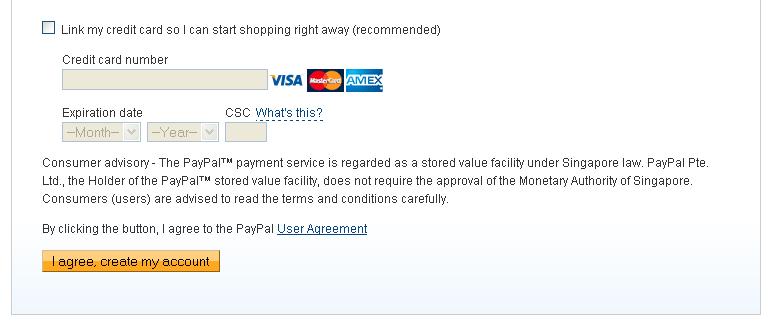
Enter your credit card number that will be used to enter the funds into your PayPal account. But, If you don't want to enter your credit card data, just remove the check mark on Links my credit card so I can start shopping right away (recommended).
After that, login on my account page / My Account

Check again and make sure the Name, Address, Phone that you fill is same with your credit card data, if it is convinced press the Agree and create an account / I agree, create my account.

register paypal

4. You will receive a confirmation email that you register. To activate your PayPal account, you need to open your email. Check a message from PayPal and click the confirmation link, to confirm that you are the owner of this email. Next you'll be taken to PayPal's site again, and just follow the next steps.

Done, congratulations you have a PayPal account!

You already can use your PayPal account right now...!!!


Note:
___________________________________________________________________________________
Now your PayPal account is Not Verified / Unverified.
To make a purchase online, send money to other PayPal accounts or receive money from other PayPal accounts with unlimited limits.
To eliminate the boundary limit of your Paypal account must be Verified.

During yet Verified / Unverified, you can't withdraw your PayPal funds/ withdraw to your bank account or to your credit card. To withdraw money from paypal balance, you should have Verified account.

Profil / Profile --> Tambah/Edit Rekening Bank / Add or Edit Bank Account">If you would like to add a bank account, login with your PayPal account and go to the Account / My Account -> Profile / Profile -> Add / Edit Bank Account / Add or Edit Bank Account

Profil / Profile --> Tambah/Edit Kartu Kredit / Add or Edit Credit Card">If you would like to add a credit card, login with your PayPal account and go to the Account / My Account -> Profile / Profile -> Add / Edit Credit Card / Add or Edit Credit Card

1 person is allowed to have up to 2 PayPal accounts. as necessary, namely 1 account type Private / Personal plus 1 account type Primary / Premiere or type Business / Business.

Example: you already have an account type Primary / Premiere for purposes of your online purchase, and want to create an another account anymore for personal purposes such as to shop for separately from the main account (Premier / Premiere or Business / Business) is to sell or do business.
Account Private / Personal has the advantage of discounted fees are lower. To create a PayPal account again with a different type you can repeat the registration steps above, use data self-Name, Address and Phone same, but use email and Bank Account / Credit Card different
___________________________________________________________________________________


Enjoy PayPal...!!! :)

AND...NOW, I KNOW...!!!

(c) Written by: Nanda Firsta
Source: Own Experience
READ MORE - How to Register/ Create a PayPal Account

1/14/11

Know your Blog/ Website Costs

Hi all... Do you have a blog/ website? Do you want to know how much is your blog/website costs? Okay, it's very very simple to know it...!!! Let's try this way:

Here, I have a information about a website that provides a free blog/ website cost counter. Well, you just have to visit:

www.business-opportunities.biz

In there, just enter your blog/ website address, then click Submit... and... Tadaaa...!!!!
How much your blog/ website cost...?? :D

Try it, it's free and amazing...!!!

AND...NOW, I KNOW...!!!


Written by: Nanda Firsta
Source: Own Experience and supported from www.business-opportunities.biz


data:image/jpg;base64,/9j/4AAQSkZJRgABAQAAAQABAAD/2wBDAAkGBwgHBgkIBwgKCgkLDRYPDQwMDRsUFRAWIB0iIiAdHx8kKDQsJCYxJx8fLT0tMTU3Ojo6Iys/RD84QzQ5Ojf/2wBDAQoKCg0MDRoPDxo3JR8lNzc3Nzc3Nzc3Nzc3Nzc3Nzc3Nzc3Nzc3Nzc3Nzc3Nzc3Nzc3Nzc3Nzc3Nzc3Nzc3Nzf/wAARCACkAOMDASIAAhEBAxEB/8QAHAAAAgIDAQEAAAAAAAAAAAAAAAEEBgIDBQcI/8QAPxAAAQQBAwIDBgMFBgUFAAAAAQACAxEEBRIhMUEGE1EiMmFxgZEUobEHM0LB8BUjJFJy8TRiY4LRQ1NzkuH/xAAZAQEAAwEBAAAAAAAAAAAAAAAAAQIEAwX/xAAlEQADAAICAgICAgMAAAAAAAAAAQIDEQQhEjETURRBImEVMjP/2gAMAwEAAhEDEQA/AKihJC9Y84aCladoATSCaAEJIQDHVNJAQDQi0WhIIBF9Ucd+i7nhrGwCcrUNaP8AgMKMPkABNuJpoode/CrdqFstEOnpHFpHRW2bH0OXVZdIfhZED4g3bkRSDd7bd9ODuoDSOee911WvxLpGmY2TgQYTnw5ebN5EePv3NJBDXO3dW0TXez0pcFyob7Oz41pdFWRXF9laY9BwscQ6fnyvdqWZJWP+HG4RAC3OqxuaDYPIHHCNX8M472Sz+H8tuY3HOzJha65InDg8dTzdjt6+llyIb0VrBaWyqoT68ggj1CRXfezjoSEItCAQUrSQDSQlaAaEkIBoRfzQg2JCEISCEIQAi0IQDQkhANK00qQDQhCAbVao4Hs0nw5g/iY44s/MOXk24AeUwA+0D1FN+6qoFji7PHCs/ieTFwcjUjGzzI9L0uHBYatrZJbD/rtPRY+XWlo1cWd1sfgtjdU1bU9Uyo2ukEzn29hc72uQBfSuBZ9OE9Ljbq3ijK17JlDcbGZ5WJKSNuwAkyi/+W3HrW+uLClBsukeD4Y2maXLyA1gdGafvf7IHJJPs+yD6VwKpSjgsfC3SPNiMJb5moSxtDGiAdfdA5lLXfHaD2ACwHoJdEJk72MfrALhqGsH8NpkVjdBjX1Ho4j2vmWrZDjYuC6E4cjzm48gjklxHGKXIlc392SCA4uHtEkWxoN805QNdxMrWNRhyYntxv7kOgfKwgY0N2HN7GgC4mu1cEAI1rKGDHDpmliQ5z2eVG0Nc+UbyLuv/UeSC43YFMHdCpv1CbS9Szn4Uz8aPKkFx5kZpgeP4eBzHZA3Hnv3pVvLxpsTIlx8mN0U0R2vY4cgq5R6fD4f0+TJzI4cvOMYDWv2sZCwihucB04okCzR2irKjQ5Gm67BNiagIMaaIkxZMbBH7oFgi/eF8tJqi0jm1pw53D0zhlweS2inde6F09Z0fL0mdseUz2X8xyMHsyD1H/g8hc0g+i9GaTW0YKlp9mJStMpKSoJd0EoUkAn6fFaMjJigbcjqPZvcrk5GqSzWyL+6b3INk/VUdpHScdUdl2TAwlrpowR1BcAhVRzAXE00/EnlCp8p1/H/ALLekgoXUzghCEA0dUBCAE0kwEGgQmASeApGPgZmUzfj4uRKwXbo4nOH3AUNpFlLfojIW6bFnh/fQyxX08yNzL+4Wuh8FCpMly17Oh4dwxna5hYzh7Ekzd3waOT+QVjmxG6lqDGsmeTnZ8moyMawuth9lo9CQ1hNH1XP8HYmXJNmZOI2pYsZ7I3uAoSOIa0c9+SrBBN5bMvKxJGPLnfh8ItYSQGjaH0OoFWav3T6rzuVW6N3GnU7ZryPKy9bkypWN8jTmOayRpLSXuAa9zTXNW2Iep7k9MNWaY3QaZIwuydTn35rmA+7RPltIFEBrQ35V/m4mMjh0XTvNewNixLJjaXB0ktHaOTzQcSea3Oe7g3UBkEcT5dVyonPzJh5ccQJ4B42hoPvEO9ogkgey3k2sxo2ZatqLcQwtjjBypXBuNjRnd5jw47TXcN520OoLv4WrQ9uL4UxfxuZFHk61OP7to6i+HEnmhzV+h288kzcDFOmA5+fsk1WceyC3c3Fa7gCm9etHbyaocNJWONBO+d+bK7y3ktD8iUNd5DQR7I42vkJ6cFrSTxYDRI9kLS8R+bqMeRkl+dnmPfIBQjjk3Ooh1GmgBpbQIvpZAUzU83Hwx52O/DfmSvP+MncL3Bovy2m9xoNBP1JNUuXk6lPqTm4Wj4uV/ZO4fishrXPkyAauz1oizzz26UFu0uXTtKwHmePzsmUmCeOJrbcT1jBPRtV0rqOrg63sb0WLDyI9Z0drpsZuRG/9/A4+44cOLT69we4o/Pz3W8THwtUycbEnM8MbtrXkcn4fGvVWLS8uTQ9ZbBmxOiizaa57uBv6NcTQBPVrj3NGhypfjDQ/wAZp2TqOnRD8djsLnwke+G9Wmv4h+fT0WjBl8Hp+jPmx+a2ign07rTNPDji55mRn0c7lVvM1XJmJ3SFjD0azgf+VzpJC51uJJ+Jtaq5CXozTg+yyS67iM9zzHn/AEgD7qJJrb3e65rG9to5+64YdaDVrk89M6LFK9EuTM3PJLS6+5PVYfigOjAPqo9JgLn5tl0tG4T+jR90LTSFPkyS9pJlKl6J54kwhCgkfCEALKkAgB3Vr09uDFgwNj0/HlnLAZpshm+3Hs0HgAdPVVYBdDAzJmFsIa9xJ2x7G24fId1n5Ktz/A3cGsU5H8iLCyDF87zf7PwQ/pRhJaP+0mvyUnNysvKwfwRfG2LoxkcYYB9B0VczdVk0eZsGoPMMrmh+xzPaaD03Dq096PNEHutD/FOOGk/io6HPAsrzHVP2e7OPAu50WjS8jPwWuZFnExjqx9u/UqZ+Pe6rxsNzx7r3Qtc787VJ07xViAlsr5JASTfluv8AIKY7xfp7BuayZrrobmUL6XyoTaIrHi9svI1HJk0j2pGPyXu2xAjaA4nawUOv8Tv+1aoYIXSQti2OhhZ5OJGdrxYA3Si/Xjg9g3/MVVdM8T6cdjWZGXI2MEMd+EfyTy55q6PYAdLJ9Auwc+HNl/A4krHz5UVzuicD5cfIDboAuPI6WfkRU+X2Yqx99I25GXFnyuc2NwwsGQ17DXfiJD02tI5cXO62DxZq3VNIdpsQysxodmFvsQsJcIm80AONzqLqHVxLgOrlljQMxJomQsM2YCQB1bBuFlzj6mz8TdD1JHMMaYtifLmZsrzuf1AdQBDGnjsOeg+hCI5taIEkLoZGZGsZYcXlz48WxG6Q2TukI5IaDXHQWBdkHXnFku2LUS049f3OLFELfHTejP4GizR95zeKC3Rxluft2jK1BxbJ7TjsjBDfdNHe7m76N5oGiF1IMRmK8vmcMjMsHdtuuboV1PJP6UhCZCw8R8rY8nMhfjRt5gxo3FrrI9ARtPS+ST3Kkt03BnyHTS4rYXuluMNdt8wAcO28Gx6HpyQB1TflsxfNlyZYwXD+8c5w8uMAHgX7zutgfC677sDLx8pjHRS+a3Zvjl3X5g6Hnjm7Ffmg2vRxfEWhYmVkYcDWbJJiWueeSGjkmz3qx9vQAPwjqsmp4cckzi6cBuPnte6i8EHbIB/mrg+teoC7GswukxY3tj3COQGVoHJiJAeB9D09LVawDnYvjCTKxBAcd0pZNF5zQXsJHtV8Tbm/YdVYq+jy3xpozNC1ufDY4GInfEC6y1p6An4evfqq8eVbf2iabmab4myjmZD8kZJ8+HIeK82N3Q/Si36KpONm10RyYJWhCFQRaEigHaEkIC/mj05SHJodfkrrPjeG8RjnTYg9mrJlkIbfSzuHPS/QmlBdrvhXDiJjwMWV3HvN3c8/5ie4HX1XoPMvoz/jv7KxRIsDhNkb3mmNc7/SCf0UzP8AGuBE8nH0vT2vobXjHaDwB2H/ADbio2R+0vUD7GOxkbSK9wBvz29Pp/PlUef+iywL7OjgeH9Wzv8AhtPnLR/E9uwfc0uji+CtbneRLBHjtA96WQc/AVa3fsw8X5Op6nk4ec5798IljPZhb73HxB+4XpbHWQRf26rk89ErDJ5xD4D1R2WYpZYGQgA+eCXB3wA6381bYdExdH0/I/scMizXRODMqanv3Dp2/ICvgpeuSTx6VkTYxkbJEzzPSwLtUDL1maNpmkfK9pcXe20lrSOnHI7mr4HH145Mzfs2cfjKu0ed5WNkS5MkmS4yTFxLjISbPxPqtZ05/ZwH34VlkwsiWV0srdm9xvc42Oas3z3HVYfgMiN5jcy76G+pCzeR6k4Vo5cWl5hi/euLQOjWrKLCiYRvuSQc+1z9l22ZAxHeVM0lwA528jp19eqJ5sOWVhbG58pdyASLHT7hR5HRY5RlpxlxYKotJskAUfutxiOXO0yRkvby1wPI+v0WxsIiID5y8dt479lux8k47nbS1wd27/dV7OupS1o2jL1bTg2JmUXQiyY5RYf1FFwpw+V/kt0etUzyPw8sbJWtZkShwke8Ud3cez0poHrdrKIx5gML2kWNxHVbpNMheA0NDK92jf3ClM4Xhiu2dbTfFeg4wbix/isdgYSZJoNrTQ6fDpwP913rx8qF0sDtzZ2A72k+2Og5HPw/L4Lz/L0udrHBtSM6kV3+XzS0bOm0mQswyBC47nwONsJ716HkchW8jNXF/csm+KjkMmgfI9rY2ReXQb7Ecw6Oq+A7g18SOaU3wnBNNJJlhodDx5eQ5/G4kbmgenWv9Xqujjavg5xBe5sMkgMT8eUA+f02gdjRJ5+PKnZk8LcEv1Oom0HBo9r2qDgOntOvkBvoL6qyMdRUvbJ/4gOgbJAWljnUH0S0kiwbHbjr0VexcpmR5r8EOyczIG10jG7WDg1VduDVV15IJBGhs+f4pd5OGwx4B3B0krQQea9rs/iiGD2RfPItUTxb4vMEMmiaB58GLHcc2VKSJ5+TYvq1t7vZ+J4FkG2iu0iX+1HXNJn06DR4CzKz8aYu8+KvLhBsOZuA9ong0OBfHReXOW17vl9lqPKto5b2CEIUkAghCCUAIStCAmv1LMeCH5EhaSXEXxZ7qMZHm7cTfxWCFO2SO+KofZNvJWKY6qAW79nGe7B8Xac8dJZDA7ns8EfqV75E10p9pxHrXC+ZdMyHYuVDkM96GRsgPxabX1IDYB6bhaIGswMcx8bhYeC07ueq8hbK7GmmxMja3KikdG5pdRoGuvTsV7FV8BeZ+LcOFniPNbKxpbKRIQDThuAN/cH7fFUyLo28Omr0cyRxc8mOWKRws+W5vS+OK57fFRsrOjhg2wkGwAGtJFcdu4/rqs36XDIAxznNdwBICOqm4+BiQSRulAbJGC1xAsEg1fob7/Vcj09kHA0aXNDMnLmLY3WeluNVfT5jsuo3SosY7sVm4kAh3c2OVMmh2jh21oa4Hkk8AUOfqFEL5hG1zJDtBNAD4KNkLs05mmZEjdj/AGfkQf66rDC0x23bv2sb17n+uF0Mf8TOQ+Uh0d+9x8f50pQZt4Zw39f6tC+/0cd0c+I8ub0HDHt/n6KB/bepQZT2Pjb5bQSGucN3Avjj+RVoYwDiuD1pQNS0mPIhIbE18fRzD1+FKV0UyJv0czG8WwuAEjmNd0Bq10oJMDKbubINnWgCKvr9yuCdFiglbBIw+SXf3xABcG3YA+F9SOfhxz19M8P1hyyQzOxo27TFJvEm8OPBcznv7I2kEk8gUVbSfoz/ADVL1aJudiRmB0kG10fUgHilt8MR/jslmBky+wxtQG3CQt5tm67A69OTZBJoKvNyc7T8v8DqrfIyOpAdbTY6ccf+O9Lr6ZFu8/IaS2SENMZHYiyPzAH0Rey2SZuG0em48UcETY4QGtY0ANAoAdhXovnT9oTdnjPWhVXlud96K+jGPcY2uk2te4AuF9DS+e/2pCNvjfVBEQQXMJr/ADFgtdzxmU8lKkIUAEIQhAIpCEAUhBKEAk0k0AJhJMISSYP4v9JX1VH+7Z/pH6L5Ui4BPej+i+qsfnHiPqxv6IQZjjkql+NYGx6lBOAA6eHYd3AtpNfk4fkrrSqnjRzXz4kYeN8bXvLau7LaB/8AqVF/6mji/wDQrUUEXlWxh3/xNuvkQexH6jta1veH217BuB90M5bXFHuOv+6xeXbNrQwMd0DifZr4/T7Ck5nee1ry8F9kHcBYPzHX+aznrmWK9j3gueC0scNxPTntXfj9FKleJIgQW+4GcUD2o0Dx2+y58jYxI/Yxw2Ntw6gX/Ln+uFq3ua4kOBANgdvsULI62NHshZRJsX6Bbmh1gEn5X1WjByGzR0eHtJsH07cfIqQCCaB59PVCdkHVM6aBhOLGXyMcNzehI+Hqs9L1rHzW8O9oHaWlp6+hHYqa6NsrRvjY7ijY7Lkapp0UbRkwAscBTnt5cfj8QhV9nQz8WLIAfW17bNj+f9fooOm5kuBO57I45JWB2wvG7y3Hje30cR3qyokWdmRk48jy11WHVYcPgfmenXhbiwFludb3E9Oileytyqkj4+q4mXqbcrVMd82NAd0UD2bvOdXV+7sOtUbPJ6BaM7xpp+m6l/hPD7W7QHMD5jtsHgtbe0fQcFQsimzODOgPC5Ot4RysfzI2kyx8iupHovR/Hnw2jwa5V+bT9HW1z9pmr6g+sAjBh20Qwhzr7kGhXX6KjZc8mRO+aeR8krzb3vNlx9Se6wDyQeKPcLW8+qzaZZmKELOOKSV22Jjnn0aLUpNlW9GCQ+K7OLoGRKA7Ic2JvoDZXZwtLxMMAsj3v/zyckfLsu08eqOVZZkr2Ho+VlgODNkZ6Pfx/wDq7ON4fxYqMznyuH0H2XWvm66p3a1RgmfZwrNTNTcHFa0AY8Nf/GELdY9AhdPFfRz8n9nnqaSa8o9AEAoKQ6oCVCfZd8j+i+q8Yf4aEf8ATb+i+VISA036FfVsRBjYR02ivsgMvn0+K8w17W8WTWJcmSbYxwIhMgrdGOA4fBelZYldizNx680sIZuNC64sryrx5i6hn6E4Z2DjYr8SaJuPFGwgsBO2rqiDd8E+7fCOfLo74Mnxt0crJ8Q4EbntE4eem4EU5KLWsB7o3Ry7SW+05v8ACOhBHpz16/JVCbCZDmxY1UNot/8AnPNn+X0V60jw/B5Rc5jNpFe1zZ/ruuVT4vTPRw5ayraE/VYMdse+SMguq33TwK6n6rbh5eDnXEyfHLrGyngEdRx6/Iqg+I8V+DqkmKXOMbDcdm6BU7wngwZszmyC3dAD3UOeiYzusnjo9MYA1ovk0KJ9P9lhmwOyoNrJPKlB3MeAPZP1vhQ5Q/SYWltzRAhnl+hPQhSsXNZkO2OjfG/rskb1VDVrZGGRm4kg8/dLAALl4a48dS2z15qr4FmuVMGVDktJYW33Dx+a3zRMlZtkNWOo4o/NU8sOBkyRinQFxLQOA3ntXFfBXmHfSM95FiW79E7VHjcHxPNRUGnp35UD8fMYtjj7XPt9wscrJE4DWN2tHPXqVHtejgwJT/Jdnjcrlt5H8b6Ak3+qOUIWpHnM5mfosOS50kTvJf1PFtcfj6Ll/wBgZvmlhMe0fx7uCrOjr1XOsMU9nSc1JaOTi6BjR0Z3Old6e6PyXUijjhaGwsaxtdGilkhXmJn0ijuq9h346JpItWKjTCQTBUkGVntSEgf6tCEHnyLQheQekCB1QE+6A6GkQ/ic/Gxif30zI6+bgP5r6nDQ32Gg+zQ6WvlrQ3yR6riSwu2yRyte00DRBu6PyXoeZ4k1nMJM2ozlpJOxrto5+DV1x43RS8ikuniPxqNOypMLAgbLKw06VzraDXQAdSPiqVrfiDN1gNbkSERtNtjB4v5LlFxvqViVrnDK0zg81eiNl4UWW9jpNwc0VbTXC7GmarkYMHkOa2dv8LnOo/VQLpCZMEW9s6YeXkxLUkXW8f8AtbfK8hsxcXNce3w+SgaV+KwshrjjyNlHBG07Xehsd12UA0KVb480tE4uVcV5ErF8Ux5mRFHM0NZGLc918uHA+vJ7Lr6vkxSYrJsSRhlY4OB5oDuPqqq/BhdI+RgovNuoWCfVSm7o4mxAktZyOKpZVxK8uz0f8nPx/wBnSbrGUWlrptoPBF39lCyphM4bRTQOL6/VabPqhao48RXkjz83NyZY8GCSaFoMYqR3QmgBCEIAQhCAEJWhCDJCSYUgd1/uhPcB6IQHnyazbFK73Y3n5NK3w6fmTfusd/zcKH5rylNP9HobRGSsX1XWj8P5jxb3RM+Zv9ApMPh0g3Llcf8ATbz9yVdYbf6KvJK/ZF8ON3ak13/ttc78qVoUPB0vHwnb2Oke+qtx7KYtmGPGezNkryfQkk0Lro5gmhCAEIQgAdEdkIKaAIQmgEEJoQCQmhAJCEIQJBT7IQCQmhACYStO1IC0IQgMQ8nqfzS3G0IUpDbMq7oQhGSJFoQqkL0NJCEJGgIQgGkhCAZQhCARQEIQDQhCEAkhCAEIQgAIKEIASQhACEIQGY6IQhAf/9k=

READ MORE - Know your Blog/ Website Costs